AI-Powered Document Intake & Routing
Capture PDFs, forms and attachments; extract verified fields; classify requests; create records; and route exceptions to the right owner.

Connect document intake, CRM updates, email, meetings, approvals and AI agents into one controlled operational system. We help teams automate business processes with AI through custom, AI-powered workflow automation that keeps people in charge of exceptions and important decisions.
Our AI workflow automation services connect triggers, business rules, AI decisions, existing software, approvals and exception handling into maintainable systems—not disconnected tasks.
Capture PDFs, forms and attachments; extract verified fields; classify requests; create records; and route exceptions to the right owner.
Enrich, deduplicate, score and route leads while synchronizing follow-up tasks, pipeline stages and ownership across your CRM.
Turn approved meeting transcripts into summaries, decisions, assigned tasks and searchable knowledge without losing the source context.
Classify inbound email, retrieve customer context, prepare policy-grounded replies and escalate sensitive or uncertain messages for review.
Build queues, confidence thresholds, approvals and audit trails around AI so high-impact decisions remain visible and controlled.
Coordinate n8n, Make, Zapier, databases and custom APIs with retries, alerts, logs and recovery paths across the entire process.
Useful automation owns the complete handoff: intake, interpretation, validation, system updates, approval, recovery and evidence. AI operates inside the process—not outside its controls.
A document, form, inbox event or system change starts the workflow.
AI classifies, extracts and retrieves the context needed for the next step.
Business rules and confidence thresholds determine the approved path.
Important exceptions pause with source context and a proposed action.
Systems update, tasks move forward and every decision remains traceable.
Most operational friction lives between systems: an email and a CRM record, a document and an approval queue, or a meeting and the tasks that should follow it. Our AI workflow automation services begin by mapping those handoffs as they happen today.
We separate the steps that require judgment from the steps that can follow stable rules. AI is used for narrow tasks such as extraction, classification, summarization and response preparation. Deterministic logic continues to control permissions, required fields, calculations and system updates. See AI workflow automation vs business process automation for a detailed comparison of where each approach fits.
Replacing every application is rarely the first answer. Custom AI workflow automation can operate across the CRM, inboxes, document storage, project tools, databases and internal applications your team already relies on.
The workflow can collect an incoming message or file, structure the relevant information, validate it against business rules, request missing details and update the correct system of record. It can then create the next task, prepare a response or route an exception with the original context attached.
Not every action should happen automatically. Our AI business process automation services distinguish between routine steps that can continue safely and decisions that require human confirmation.
Confidence rules, business conditions and approval requirements determine whether the process continues or enters a review queue. The reviewer sees the source, proposed action and relevant context together. The final decision is recorded before the workflow resumes.
Customer change request.pdf
3 pages · received 09:42Route to account operations
Confidence 78% · policy match 4.2The platform should follow the process—not force the process into a predetermined tool. We choose the orchestration layer after understanding complexity, data sources, security, volume and the team that will own it.
One operational system may use more than one platform. A SaaS trigger can begin in Zapier, complex routing can run in n8n, and specialized validation can happen through a custom API.
We use n8n when the workflow needs complex branching, reusable subflows, direct API communication, custom data transformations or closer technical ownership. Custom n8n automation is especially useful when the process cannot be reduced to a simple trigger and action.
Make or Zapier can shorten the path to a working pilot when a process connects well-supported business applications with clear triggers and actions. We still add validation, naming standards, ownership, error paths and documentation.
Custom services are appropriate when the operation depends on proprietary systems, specialized validation, higher-volume processing or bounded agent actions. Deterministic code controls permissions, required checks and final system updates.
Our AI automation consulting services help teams automate business processes with AI through a controlled rollout. We begin with one defined process, establish its boundaries and agree on what success should look like before implementation.
The pilot uses representative inputs and known edge cases. We test normal routes, missing information, integration failures, review steps and recovery behavior. Before rollout, the workflow receives an owner, documented permissions, fallback rules and a clear change process.
Two different operating models show why the workflow, evidence and human control points matter more than the automation label.
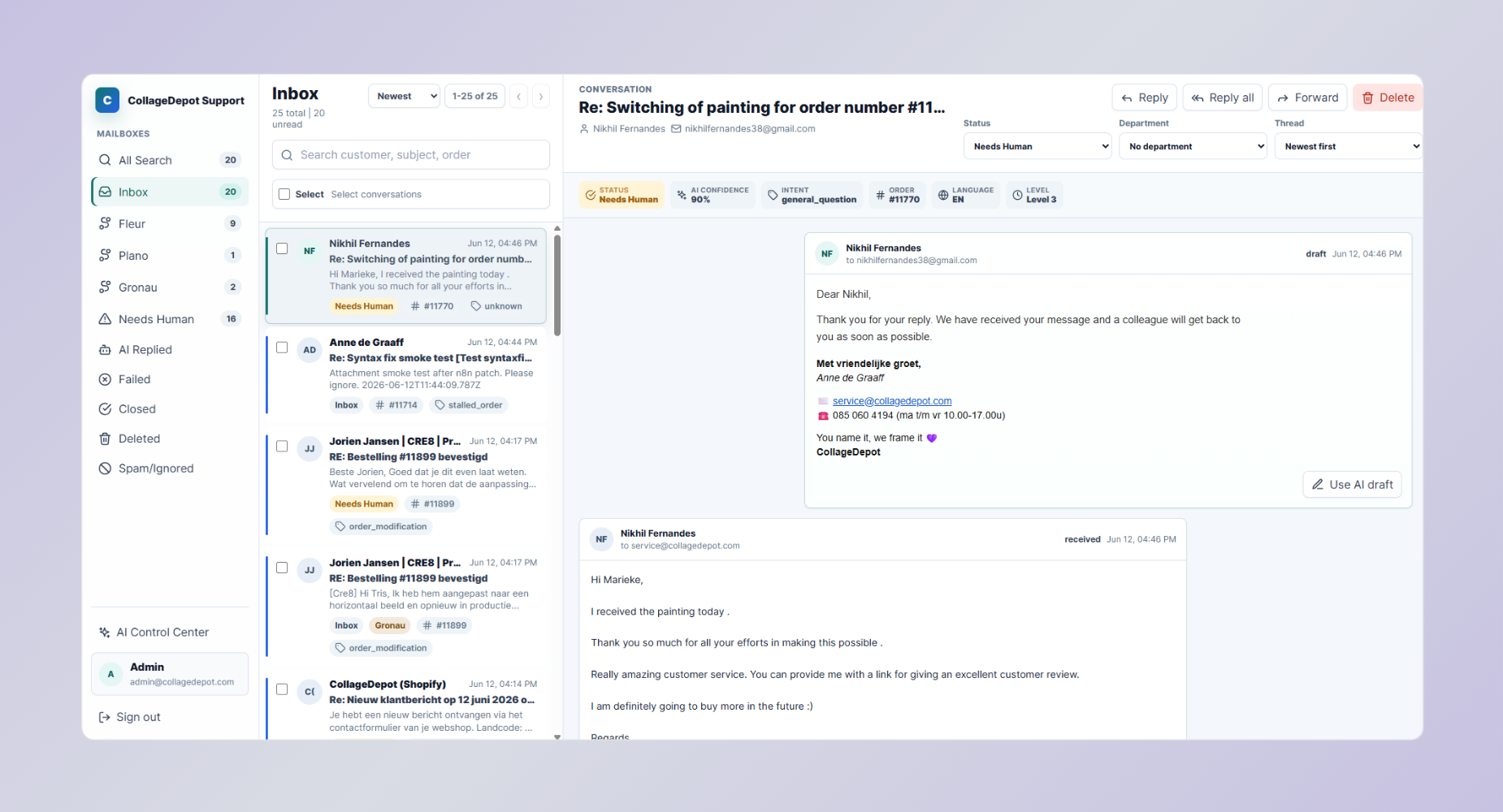
An n8n operational system connecting email classification, live Shopify data, multilingual replies, sentiment thresholds and human escalation.
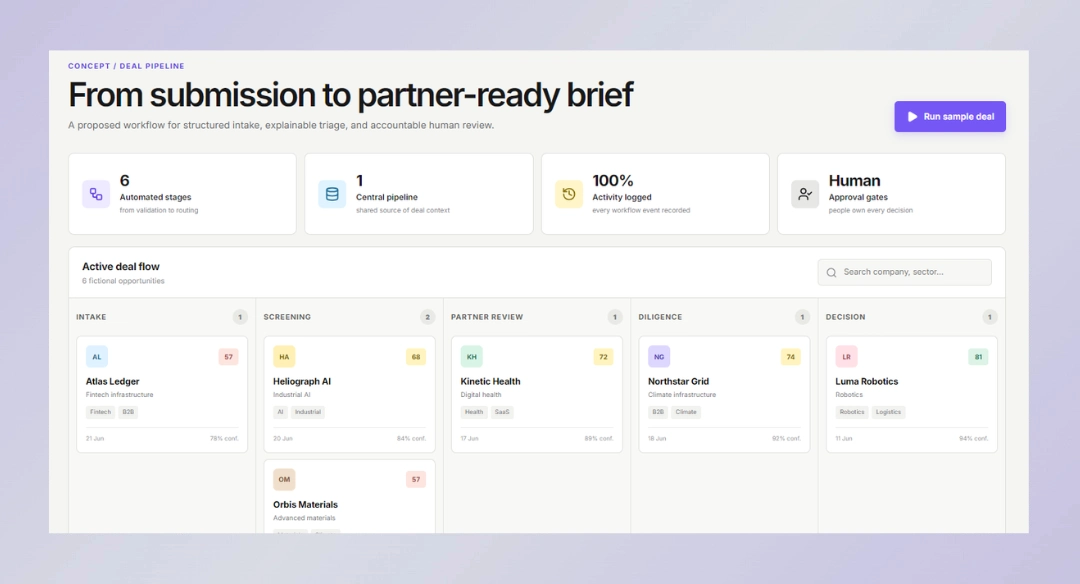
A six-stage concept for founder intake, evidence-linked extraction, transparent screening, exception routing and partner review.
Our AI automation consulting services start with operational reality: owners, systems, exceptions, security and the evidence that will define success.
Map the current process, handoffs, systems, exceptions, permissions, volumes and baseline cost of manual work.
Define the future-state workflow, system boundaries, AI task, approval rules, error handling and measurement plan.
Implement a controlled pilot, test representative cases, verify integrations and document ownership before rollout.
Track failures, retries, review rates, latency and business outcomes; then improve the workflow under version control.
Use this operational readiness check before choosing n8n, Make, Zapier, a custom API or an AI agent. It is a conversation starter, not an automated project estimate.
Our AI business process automation services produce a documented, maintainable operating system your team can understand. Every engagement is scoped around the actual process rather than a prebuilt automation bundle.
Typical deliverables include:
AI Workflow Automation FAQs
Practical answers about platforms, human review, data, delivery, ownership and ongoing support.
They include process discovery, system and data mapping, orchestration design, AI task definition, integrations, human-review rules, error handling, testing, launch and monitoring. The exact scope depends on the workflow—not on a fixed bundle of automations.
We design connected operational systems around your process, systems, permissions and exception paths. Templates may accelerate simple steps, but production workflows still need ownership, validation, observability and a way to recover when an integration or AI decision fails.
Usually, yes. We first confirm API access, permissions, rate limits, data quality and the source of truth. We then choose the most appropriate integration method: native connector, webhook, n8n or Make node, approved export, or a custom API service.
Yes. We use n8n for multi-step orchestration, API-heavy workflows, controlled AI tools, custom nodes and deployments that benefit from deeper technical ownership. We also document credentials, environments, error paths and maintenance responsibilities.
Use n8n when branching, custom logic, self-hosting or advanced AI orchestration matters. Make and Zapier are effective for faster SaaS-to-SaaS workflows with strong native connectors. A custom API is appropriate when the process needs proprietary systems, high throughput or specialized controls.
The workflow can pause when a threshold, policy or exception is reached; present the source context and proposed action; record the reviewer decision; and continue only after approval. Review queues, ownership, reminders and audit history are designed as part of the system.
Only inside explicitly defined boundaries. An agent receives approved tools, data access, budgets, stopping conditions and escalation rules. Irreversible or high-impact actions can remain approval-gated. We do not recommend unrestricted agents with broad access to operational systems.
We minimize the fields sent to each service, use approved accounts and environments, apply role-based credentials, separate development from production, and document retention and logging. Requirements vary by industry and should be reviewed with your security and legal stakeholders.
A focused pilot may take several weeks; a multi-system production workflow can take longer. The main drivers are process clarity, integration access, data quality, exception complexity, security review and testing—not simply the number of visible steps.
Cost depends on the number of workflows and integrations, data condition, exception complexity, security and hosting requirements, testing depth, documentation, and ongoing support. We scope the process and risks before recommending a pilot so the estimate reflects the operating system you actually need.
The agreed source files, workflow definitions and documentation are handed over according to the project contract. We can train your team, provide managed support, or continue monitoring and improving the system under a separate support scope.
Your assessment can produce a process map, key integration risks and a recommended pilot path.
Your digital success starts with a trusted web agency. We’re here to be the reliable partner you need to thrive in the digital world.
© Copyright 2026 – All rights reserved.